Intro

A framework for distributed agents

Paolo Bosetti

University of Trento

2025-Jul-07

What is it?

stands for Multi-Agent Distributed System

Contents

  • Terminology
  • Basic Usage
  • Linux services
  • Plugins
  • Parallel computing

Terminology

Let’s get understood…

  • Agent: an entity that can perceive its environment and act upon it.
  • Network: a set of agents, possibly distributed over different devices or machines, and exchanging information via ZeroMQ/TCP connections

MADS aims at being as transparent as possible w.r.t. the underlying network.

The same MADS network could run

  • on a single machine (via loopback connections)
  • as well as on multiple machines (via TCP connections), one agent per machine

And everything in between…

MADS Network Topology

To maximize flexibility and scalability, MADS networks are broker-based

  • only IP/hostname of broker is needed
  • broker does message dispatching
  • agents can filter messages by topics
  • agents can be added/removed dynamically
  • agents can act as source, filter, or sink

G broker Broker a4 Agent 4 broker->a4 a5 Agent 5 broker->a5 a6 Agent 6 broker->a6 a7 Agent 7 broker->a7 a1 Agent 1 a1->broker a2 Agent 2 a2->broker a3 Agent 3 a3->broker a4->broker

It’s a ZeroMQ network

MADS uses ZeroMQ as the underlying communication layer:

  • connections are established via TCP (XPUB-XSUB)
  • order of connection does not matter
  • disconnection/reconnection is handled automatically
  • minimum overhead w.r.t. other protocols (e.g., HTTP, gRPC, REST)
  • application-layer protocol is agnostic to the underlying transport, and left to the user
  • MADS is designed to be simple, so data on the wire is presented as JSON compressed with snappy
  • MADS is designed to be scalable: you can have hundreds of agents, the limiting factor being network bandwidth

Agents

Agents are the building blocks of a MADS network. They can be:

  • Sources: produce data and send it to the network
  • Filters: process data received from the network and send it to other agents
  • Sinks: consume data from the network and perform actions based on it

Agents can be implemented in any programming language that supports ZeroMQ, but MADS provides C++ API that abstracts ZeroMQ intricacies.

Agent Smith

Agents

Using MADS API, agents can be implemented as:

  • monolithic: a single executable that contains all the logic
  • plugin-based: a general purpose executable that loads plugins dynamically, allowing for modularity and extensibility; the user only has to develop the plugin with minimal boilerplate code and API knowledge
  • Python modules: MADS agent can load at runtime Python modules that provide a proper interface (2-3 functions)

Agent Smith

Implementation

  • MADS is implemented in C++17 and provides an API to create agents and connect them to the network
  • It can be compiled on Linux, macOS, and Windows
  • Compilation is rather tedious and has a number of dependencies, but:
  • Developing custom agents as plugins is much easier, as it requires only a few functions to be implemented
  • Example plugins are available on GitHub
  • The main MADS command can generate a plugin template

Tip

Easy to remember: https://git.new/mads!

Basic usage

How do we use it in practice?

Main command: mads

  • The standard installers provide a main command: mads

  • Inline help is available with mads --help:

    > mads --help
    Mads command line interface version 1.3.1
    Usage:
      mads [OPTION...]
    
      -i, --info     Print information on MADS installation
      -p, --prefix   Print MADS install prefix
          --plugins  List plugins in default plugins directory
      -v, --version  Print version
      -h, --help     Print help
  • Options -i and -p are useful to check the installation

Mads subcommands

  • The list of available mads sub commands can be obtained as:
> mads
Available mads subcommands:
   filter (wraps mads-filter)
   worker (wraps mads-worker)
  command (wraps mads-command)
    image (wraps mads-image)
 feedback (wraps mads-feedback)
  logging (wraps mads-logging)
   plugin (wraps mads-plugin)
   source (wraps mads-source)
   bridge (wraps mads-bridge)
     sink (wraps mads-sink)
   dealer (wraps mads-dealer)
   python (wraps mads-python)
   logger (wraps mads-logger)
   broker (wraps mads-broker)
      ini (internal)
  service (internal)
  • On MacOS and Linux, commands are available as e.g. mads source or mads-source
  • On Windows, commands are available as e.g. mads-source only
  • internal commands are implemented by the mads executable
  • Man pages are available (e.g. man mads-source)

Launching the broker

> mads broker
Reading settings from /Users/p4010/usr/local/etc/mads.ini [broker]
Binding broker frontend (XSUB) at tcp://*:9090
Binding broker backend (XPUB) at tcp://*:9091
Binding broker shared settings (REP) at tcp://*:9092
Timecode FPS: 25
Settings are provided via tcp://127.0.0.1:9092
CTRL-C to immediate exit
Type P to pause, R to resume, I for information, Q to clean quit, X to restart and reload settings
  • Line 2 and 7 report a fundamental aspect: the centralized settings file
  • Settings for all agents are stored in a TOML file, which is dispatched by the broker to the agents upon launch
  • Each agent is launched with the settings URL (e.g. tcp://127.0.0.1:9092) as a command line argument

Running an agent

  • To run an agent on a device different from the one running the broker, we need to specify the broker address
  • We see relevant agent settings (loaded from broker):
    • pub topic: messages are tagged with publish
    • compression: JSON compressed with snappy
    • timecode: all messages generated in the same 40ms share the same timecode
    • timecode offset: clock difference with broker

Logging data

  • Data flowing on the MADS network can be logged for later analysis
  • MADS provides two official logging facilities:
    • a MongoDB logger
    • an HDF5 logger
  • Regardless the logging facility, each message is stored as a JSON document with some added common fields:
    • timecode: the time when the data was produced as a multiple of a fixed timestep (e.g. 40ms). Measured in seconds from last midnight (local time)
    • timestamp: an ISO 8601 timestamp of the data
    • hostname: the hostname of the machine that produced the data

Logger

  • MADS provides an agent called logger for logging messages
  • The logger is designed to store data into a MongoDB database
  • MongoDB is schemaless, so it can store any JSON data published to the MADS network
  • Each agent publishes on a given topic (e.g. publish)
  • For each topic, a corresponding table is created in the database, and each message is stored as a document in that table
  • Each document has additional fields: timecode (a fixed timestep in ms), timestamp (and ISO 8601 time), and hostname
  • MongoDB aggregations can offload some computational load and make data easier to fetch

Note

A MongoDB instance can be easily started with Docker:

> docker run -d --name mads-mongo -p 27017:27017 -v ${PWD}/db:/data/db mongo

HDF5 logger

  • Among the official MADS plugins, there is also an HDF5 logger
  • The hdf5_writer.plugin is a MADS sink that stores data in an HDF5 file
  • Within the HDF5 file, each topic goes into a separate group
  • messages are queued, so a scalar becomes a vector, a vector becomes a table
  • the INI file must specify which data has to be saved, using a keypath syntax: "key1.subkey2.subsubkey3" corresponds to JSON fields data["key1"]["subkey2"]["subsubkey3"]
  • timestamp, timecode, and hostname are automatically recorded into separate datasets

Note

The plugin is available on https://github.com/MADS-Net/hdf5_plugin

Rerun graphical logger

  • The rerunner.plugin is a MADS sink that streams data to Rerun.io
  • Can subscribe to many topics and select data to plot with keypaths as topic.message.field.value
  • Fast: thousands of messages per second
  • Currently plots time series and ACF plots
  • Flexible: 2-D plots, 3-D scenes, bar charts, graphs, maps easy to implement (in C++)
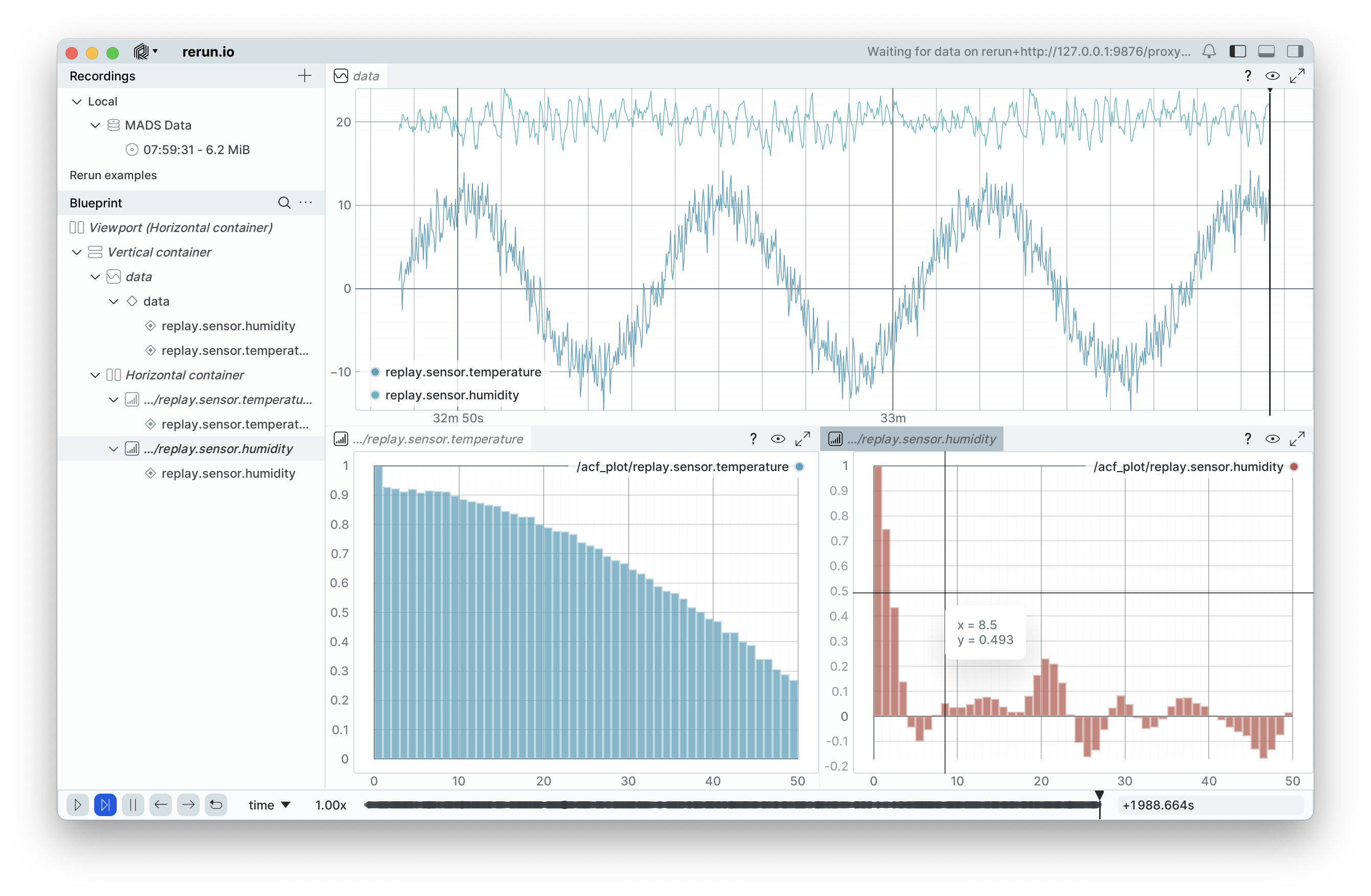
Rerun GUI

Services

Automate it!

MADS services

On Linux machine only, MADS provides a service file generator that can be used to run MADS agents as system services, automatically active on boot

Procedure:

  1. define the proper launch command, e.g. mads source -s tcp://mads-broker.local:9092 -n my_datasource
  2. run mads service my_datasource source -s tcp://mads-broker.local:9092 -n my_datasource; this prints a possible systemctl file for a service called my_datasource.service
  3. if it looks correct, run the same command as sudo: this installs the service on the system dir
  4. enable the service: sudo systemctl enable my_datasource.service

Plugins

Or, please, make it easy!

Motivation

  • MADS is designed to be simple, but it can be complex to implement agents
  • Implementing an agent (monolithic) requires knowledge of the MADS API, ZeroMQ
  • Compiling the agent takes time and requires a proper development environment, especially on Windows
  • We wanted to let users focus on the agent logic, not on the boilerplate code
  • At the same time, we wanted to keep the advantages of C++ (performance, low-level control, etc.), without forcing users to revert to scripting interfaces just because the whole C++ framework is too complex

Solution: MADS plugins

MADS plugins

  • A plugin is a shared library that implements a specific agent logic
  • Plugins are loaded dynamically by the MADS general purpose executables:
    • mads source: provides information to the network (e.g. by reading sensors)
    • mads filter: processes data received from the network and sends it to other agents
    • mads sink: consumes data from the network and performs actions based on it (e.g. by writing to a file)
  • The specific agent logic is implemented in the plugin, which is a C++ class that inherits from a base class
  • MADS provides the mads plugin command to create a plugin template

Running mads plugin

  • The mads plugin command creates a plugin template in the current directory
  • The template contains a CMakeLists.txt file and a src directory with the plugin source code
  • The template has minimal dependencies:
    • A C++17 compliant compiler (VS 2017 or later, GCC 7 or later, Clang 5 or later)
    • CMake 3.15 or later
    • Any other dependency must be added to CMakeLists.txt
  • CMake can be configured to install the plugin in the MADS plugins directory, so that the plugin is automatically found

Plugin class details

class My_sourcePlugin : public Source<json> {
public:
  // Implement the actual functionality here
  return_type get_output(json &out,
                         std::vector<unsigned char> *blob = nullptr) override {
    // Your logic to fill 'out' with data
    // optionally use 'blob' for binary content
  }

  // Run only once upon start
  void set_params(void const *params) override {
    // Optional: handle parameters passed to the plugin
    // This can be used to configure the plugin at runtime
  }
private:
  // custom fields here
};
// Macro that does the magic of allowing dlopen to work
INSTALL_SOURCE_DRIVER(My_sourcePlugin, json)

Plugin class details

  • Implementing a plugin does not require knowledge of the MADS API
  • Only two methods (three methods for filter plugins) need to be implemented
  • Any third party library is left to the user:
    • add necessary find_package calls in CMakeLists.txt
    • link the library to the plugin
    • include the necessary headers in the plugin source code
  • The plugin source code also has a template main() function: beside each plugin, a one-shot executable is provided (and compiled) that can be used to test the plugin logic without the need of a MADS network

OTA plugins

  • Plugins can be loaded Over-The-Air (OTA) by the mads source, mads filter, and mads sink commands

  • If the INI file contains an entry like this:

    [my_source]
    attachment = "/path/to/my_source.plugin"

    then that file (on the broker filesystem!) is sent to my_source agents when they connect to the broker

  • This allows to have all plugins in a single location, and to update them without having to manually copy them to each agent machine

Parallel computing

MADS can be also use for dispatching parallel computations on HPC clusters

The dealer-worker model

Suppose that you want to explore a large domain of parameters for a simulation to perform sensitivity analysis or parameters optimization:

  • ZeroMQ provides a special PUSH-PULL communication model between a single dealer and multiple, identical workers
  • The dealer distributes tasks to the workers in a round-robin fashion
  • Each worker processes the task and sends the result back to the broker
  • In a possible implementation, a source provides the grid of parameters combination and a logger agent store the results

Dealer-worker broker broker dealer dealer broker->dealer logger logger broker->logger source source source->broker w1 worker 1 dealer->w1 w2 worker 2 dealer->w2 w3 worker 3 dealer->w3 w4 worker 4 dealer->w4 mongo MongoDB w1->broker p Plugin w1->p w2->broker w2->p w3->broker w3->p w4->broker w4->p logger->mongo BSON

The MADS implementation

In MADS, there are two special agents for this purpose: dealer and worker

  • dealer: receives the computational payloads (simulation input) from a suitable source agent, and dispatches them to the workers
  • worker: receives the computational payloads and uses a custom plugin to process them (of type filter), then sends the results back to the broker

Ideally, the worker plugin is launched in \(n\) instances on a Kubernetes cluster; each instance loads the computational plugin OTA from the broker

Security

Starting from v2.0.0, MADS supports authentication and encryption over the network

What is it

  • Encryption is provided via ZeroMQ CURVE backend
  • CURVE provides elliptic curve cryptography via public/private key; provides same security as RSA but with much smaller and faster keys
  • Public/provate keypair also provide authentication
  • IP whitelisting is also supported

How?

  • The mads command can create the public/private keypair for a device
  • The broker must have the public keys of all connecting devices, plus its own private key
  • Each device must have the broker’s key, plus its own private key

Contacts

  • MADS homepage: https://github.com/pbosetti/MADS
  • MADS Plugins: https://github.com/MADS-net
  • Developer:

Partners

  • University of Trento, Italy
  • INSA Toulouse, France
  • University of Brescia, Italy
  • University of Perugia, Italy