Mads command line interface version v3.0.0
Usage:
  mads [OPTION...]

  -i, --info                   Print information on MADS installation
  -p, --prefix                 Print MADS linstall prefix
      --plugins                List plugins in default plugins directory
      --keypair [=arg(=mads)]  Generate ZMQ CURVE keypair
  -f, --force                  Force operation (if applicable)
      --rooms [=arg(=5000)]    List rooms advertised on the network
  -j, --json                   Output in JSON format (where applicable)
  -v, --version                Print version
-h, --help Print helpDistributed systems with 
Delivered at Scuola Gorini 2026
2026-Sep-03
Contents
- Requirements
- What is
- Concepts
- Broker-based networking
- MADS Agents
- Types of agents: source, filter, sink
- Many ways to implement an agent
- Data sources in Arduino
- Designing a network
- Deployment
- Advanced features
Requirements
is a polyglot environment: you might use C, C++, Rust, Python, R, Lua.
That said, C++ is its core language, and for using it you need a C++ environment
CMake version
More recent versions of CMake may not work with some of the MADS dependencies. Please stay on the tested 4.2.1 version
What is ?
Context: alternatives
| Pros | Cons | Proto. | Prod. | Learning | |
|---|---|---|---|---|---|
| MQTT | lightweight, proven | low-level, no fed’n | 🟠 | 🟢 | |
| ZeroMQ | lightweight, very flexible, proven | low-level, fed’n is complex | 🟠 | 🟢 | |
| OPC-UA | powerful, industry-based, fed’n | heavy, complex, vendor-dependent, limited portability/integrability | 🔴 | 🟠🟢 | |
| Zenoh | flexible and powerful, fed’n | high abstraction, low-level | 🟢 | 🟠 | |
| Apache Spark | designed for high-loads & datacenters, fed’n | Java-based, limited integrability, unsuited to µC | 🔴 | 🟢 | |
| ROS2 | flexible, high level, feature rich | long learning curve, robotics oriented, no fed’n | 🟢 | 🟢 | |
|
easy, ZeroMQ-based, portable, flexible, polyglot, fed’n | young (3 years) | 🟢🟢 | 🟠🟢 |
Note
Low-level: framework only/mostly taking care of data communication/distribution, where business logic must be implemented every time; portability: different platforms/architectures; integrability: against existing solutions; fed’n means federation; learning curves are subjective and qualitative.
Agents

- A network is made by one broker and many agents
- Agents are processes: whether they run on a single computer or on a multitude of networked computers is irrelevant (except for throughput and latency)
- Agents communicate each other via a TCP/IP network and only through the broker
- The broker is completely transparent and data-agnostic
- The process running the broker also distributes agents settings in REQ/REP fashion
- Information is channeled/routed/organized via topics, e.g.
measurements/force/X - An agent can publish on a topic and can subscribe to anther (to receive asynchronous updates)
Agents: types
Source agents
- Acquire information from the field:
- sensors
- peripherals (TTY, GUI)
- other protocols
- Publish information on the MADS network under one or more topics
- Publishing may be timed or event-based
Agents: types
Filter agents
- Manipulate information:
- filters
- controllers
- gateways
- They subscribe to a topic, elabrate the received data, and publish back new data on a different topic
- Publishing is mostly event-based
Agents: types
Sink agents
- Dispose of information received by other agents via broker:
- to GUI (plots, charts, dashboards)
- to disk (JSON files, HDF5)
- to database (MongoDB)
- to other protocols
- Only deal with data coming from topics they are subscribed to
- Typically event-based
Data format: JSON
- MADS agents exchange data as JSON objects, because of its flexibility
- Underlying C++ library is
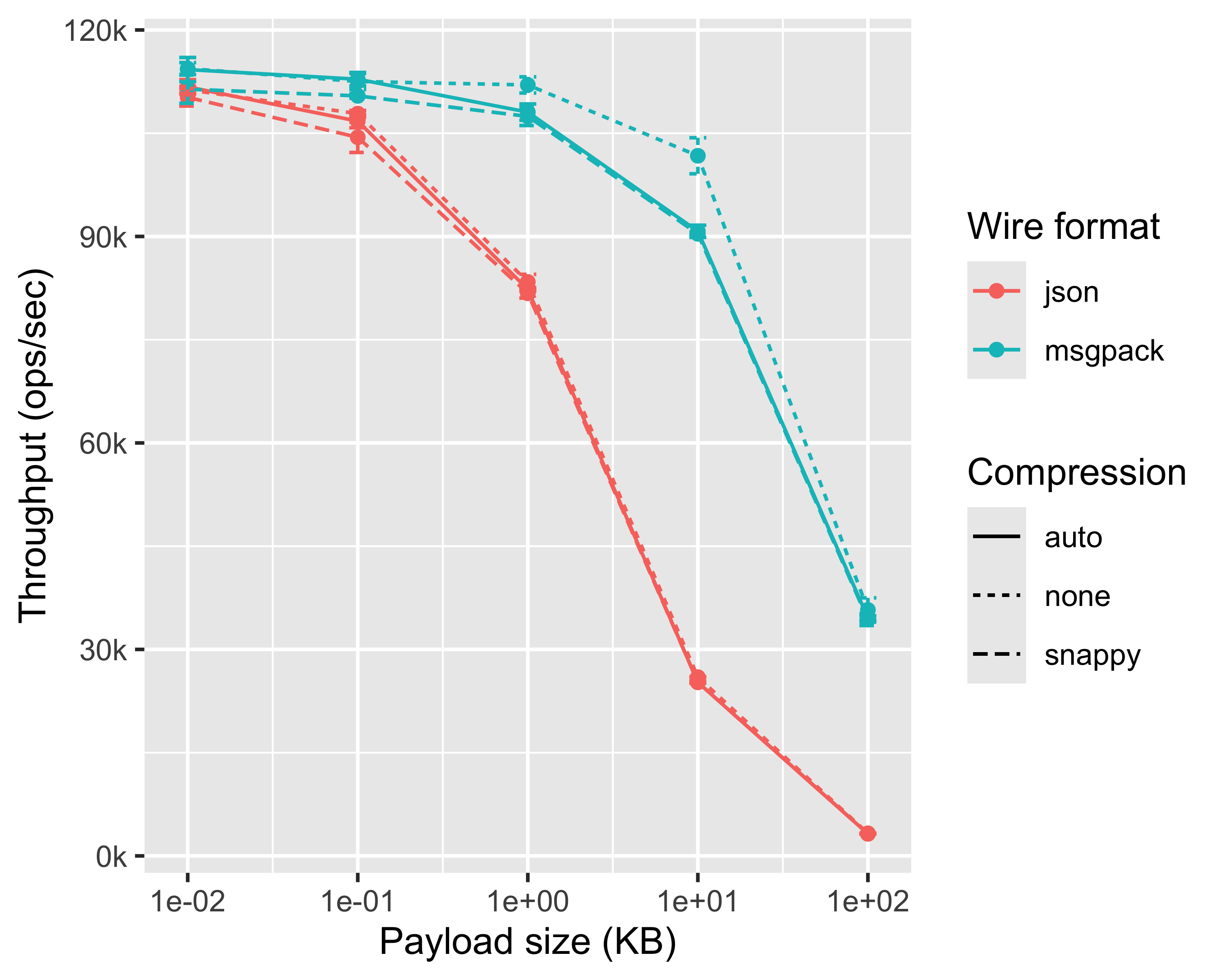
nlohmann::json - Actual wire-format can be JSON (ASCII) or MsgPack (binary), per-agent negotiable
- Directly maps to what you log in MongoDB
- Directly maps to Python dictionaries
Agents: implementation
Requirements
MADS has beed designed with requirements of flexibility and easy extensibility
An agent can be implemented in a number of alternative ways:
- C++ process, linked to the
MadsCoreshared library (#include <mads.hpp>) - C process, linked to the
MadsCoreshared library (#include <mads_c.h>) - Python script FFI-linked to the
MadsCorelibrary (from mads_agent import Agent) - C++ plugin, with minimal API surface (3 methods)
- Rust plugin, with minimal API surface (3 methods)
- Python plugin (a binary that loads a Python module at runtime)
- R plugin (a binary that loads a R script at runtime)
- Lua plugin (a binary that loads a Lua script at runtime)
Agents: implementation
The choice depends on personal knowledge/skill and task requirements:
| Method | Performance | Flexibility | Production-ready | Base install |
|---|---|---|---|---|
| C++ process | ⭐️⭐️⭐️⭐️⭐️ | ⭐️⭐️⭐️⭐️ | ⭐️⭐️⭐️⭐️⭐️ | ✅ |
| C process | ⭐️⭐️⭐️⭐️⭐️ | ⭐️⭐️⭐️⭐️ | ⭐️⭐️⭐️⭐️ | ✅ |
| Python script | ⭐️ | ⭐️⭐️⭐️⭐️⭐️ | ⭐️⭐️ | ✅ |
| C++ plugin | ⭐️⭐️⭐️⭐️⭐️ | ⭐️⭐️⭐️ | ⭐️⭐️⭐️⭐️⭐️ | ✅ |
| Rust plugin | ⭐️⭐️⭐️⭐️⭐️ | ⭐️⭐️⭐️ | ⭐️⭐️⭐️⭐️⭐️ | ✅ |
| Python plugin | ⭐️⭐️ | ⭐️⭐️⭐️⭐️ | ⭐️⭐️ | ⛔️ |
| R plugin | ⭐️⭐️ | ⭐️⭐️⭐️⭐️ | ⭐️⭐️ | ⛔️ |
| Lua plugin | ⭐️⭐️⭐️ | ⭐️⭐️⭐️ | ⭐️⭐️ | ⛔️ |
MADS-NET: a repository of pre-made agents
The github.com/MADS-NET page provides a list of open source, ready available plugin and custom agents repositories for solving common tasks, which may be immediately useful, or provide a template on which to build upon:
- Python/R/lua plugins
- HDF5 logging
- ML inference of ONNX models
- FMU plugins
- User interfaces
- JSON schema validation
- Arduino I/O
- and more
Agents: Arduino-based
- Cheapest and fastest way to ingest field data into a MADS network
- Three possible, complementary solutions:
arduino.pluginand a custom.inosketch that prints a JSON string over serial — any Arduino, but must be serial-port connected to an agent running on separate devicearduinoQ.plugin, only works on an Arduino Uno Q: the agent runs on the CPU, a custom.inoon the MCU, they communicate via RPC — Uno Q only, standalonearduino_mads: an Arduino-native library that provides low-level message passing to a MADS-network — requires Ethernet- or WiFi-equipped Arduino, standalone, feature-limited
Tip
The arduino.plugin, despite its name, works with any micro that can print on a serial port a JSON string
Agents: Arduino-based
- A new, powerful Arduino plugin is in preparation, with direct selection of I/O pins from
mads.ini, with no programming required on the Arduino side - It exploits the https://github.com/pbosetti/ArduinoDriver library and firmware, which provides a generic, low-level USB interface to Arduino I/O pins, and is compatible with most Arduino boards
- Supports read, write, stream, and interrupts
- Expected release:
Fall 2026released - Plugin name: ArduinoIO.plugin
Commands and tools
provides a number of command line tools to manage and monitor a network
GUI commands
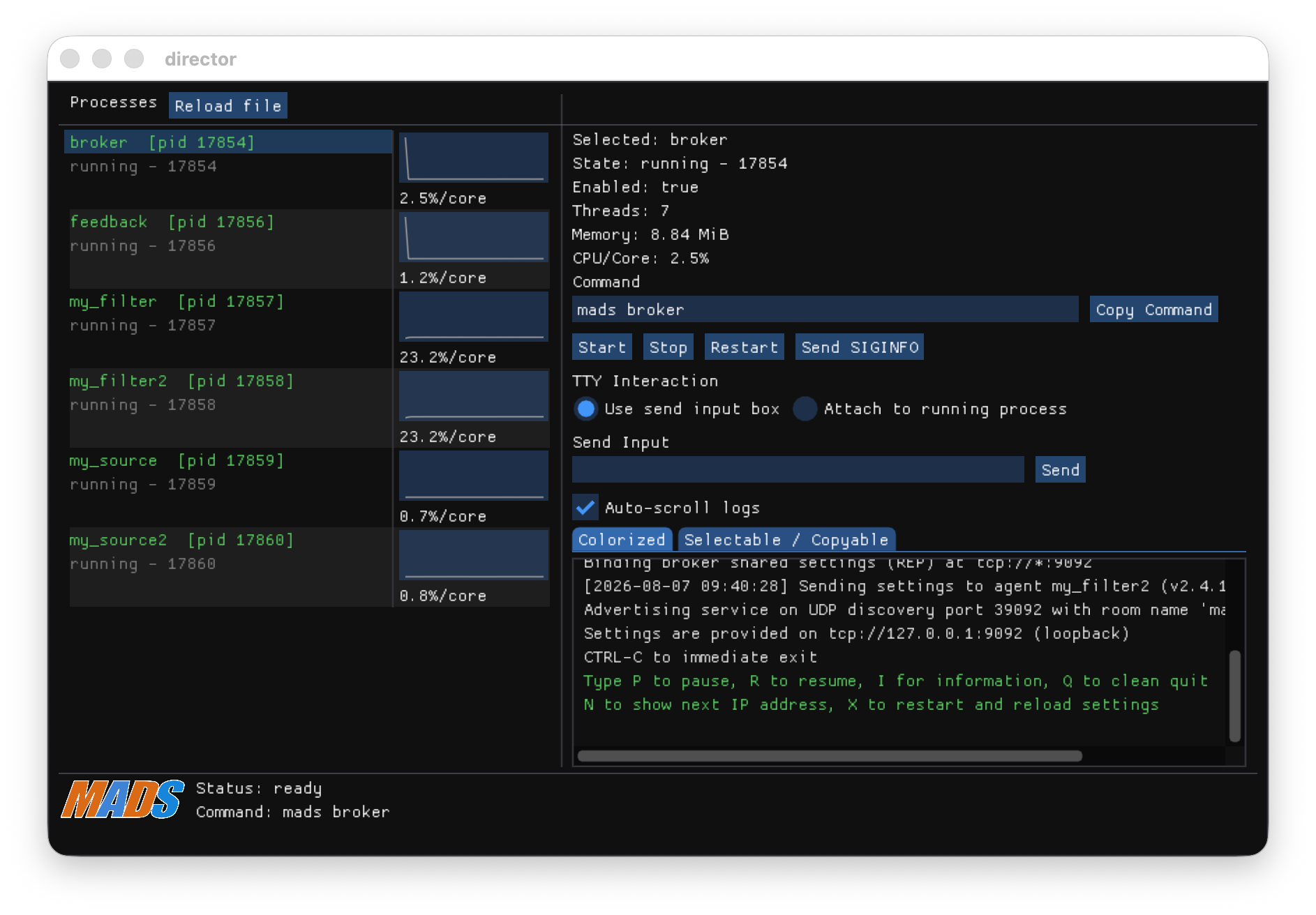
Two commands provide GUIs to monitor and control a MADS network:
mads director: coordinates the execution of multiple MADS tools on the same machinemads chat: reads and writes messages to the MADS network
(installed withmads package --install mads-chat)
mads director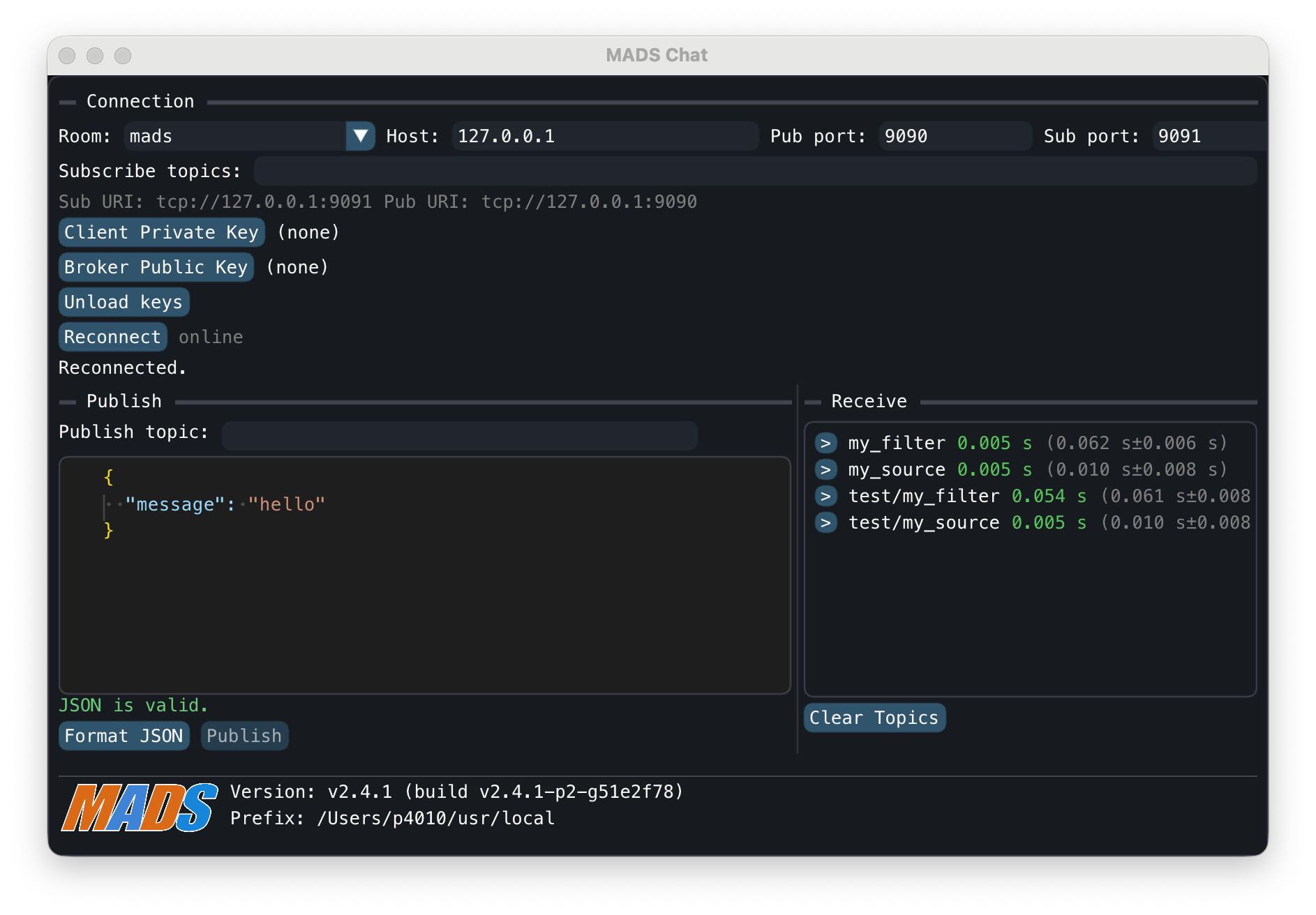
mads chatRerun interface
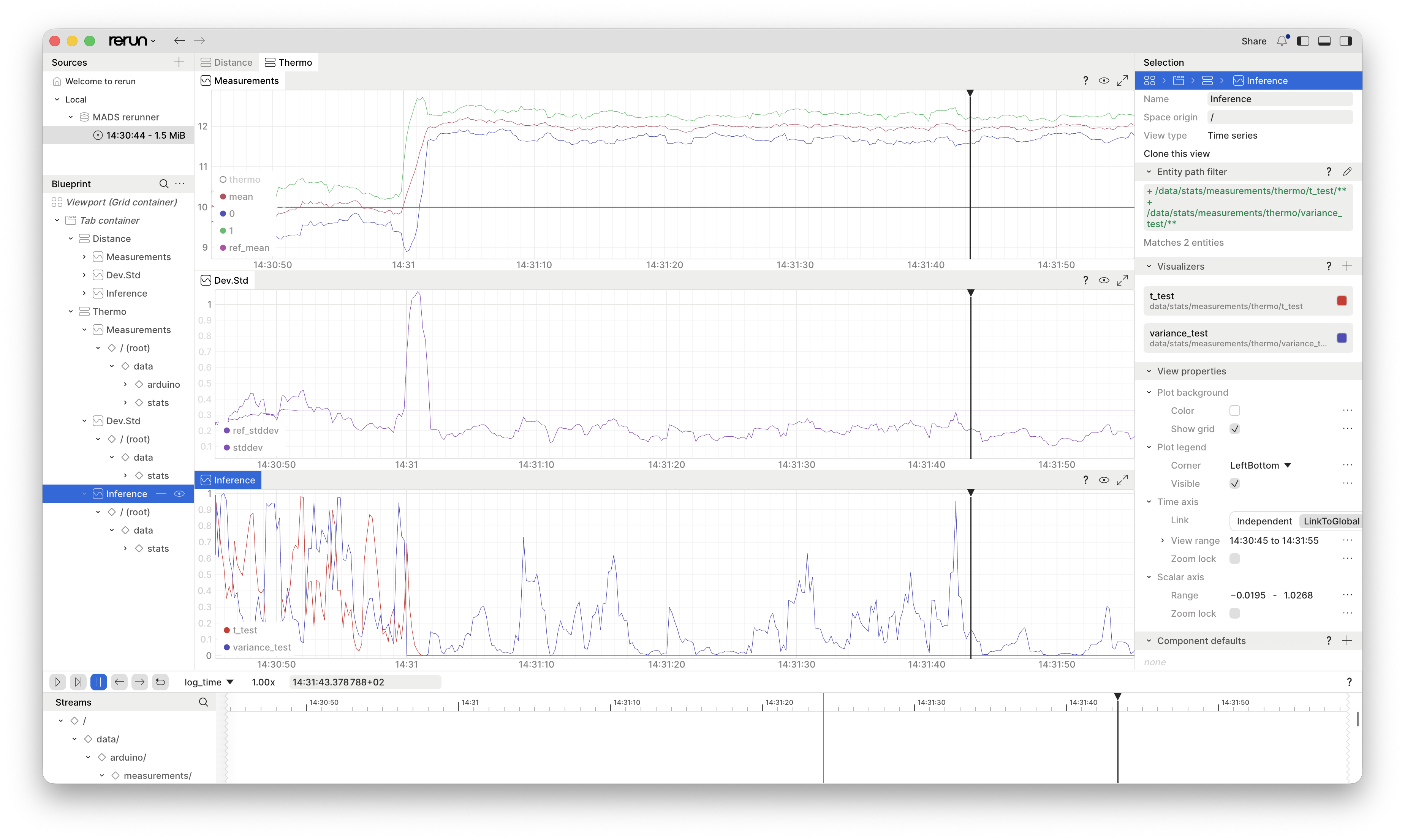
Design a network
flowchart LR
    n1["`mads.ini file`"] --> n2["make graph"]
    n2 --> n3["complex?"]
    n2 --> n1
    n3 -- no --> n4["`prototype
    plugin`"]
    n3 -- yes -->n5["`make fsm
    or API agent`"]
    n4 --> n6["fast?"]
    n6 -- yes --> n7["create service"]
    n6 -- no --> n8["template agent"]
    n8 --> n7
    n5 --> n7

    n1@{ shape: rect}
    n2@{ shape: proc}
    n3@{ shape: decision}
    n4@{ shape: proc}
    n5@{ shape: proc}
    n6@{ shape: decision}
    n7@{ shape: proc}
    n8@{ shape: proc}
FMI Interface
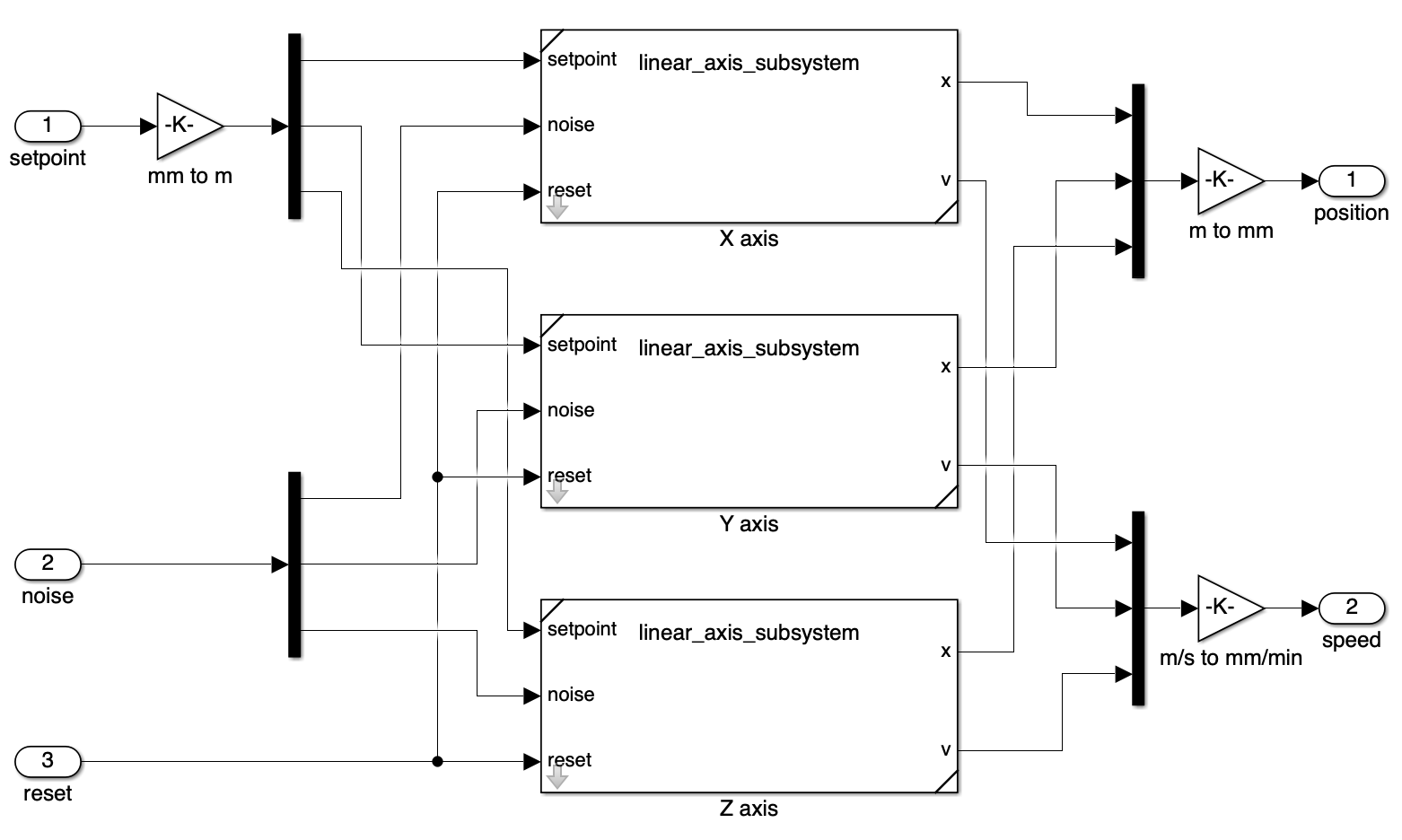
POV: you have a Simulink model that you want to integrate into a MADS network, e.g. to simulate a physical system or a control algorithm (Digital Twin)
- Be sure that your Simulink model has Input and Output ports
- Make it parametric as much as possible
- Save it as model exchange FMU v3.0
- The generated FMU can be loaded as a filter agent by the
mads fmuagent - The simulation time (TET) must be smaller than the timestep
Tip
The list of simulation software that can export FMU v3.0 is available at https://fmi-standard.org/tools/
NovaWalk
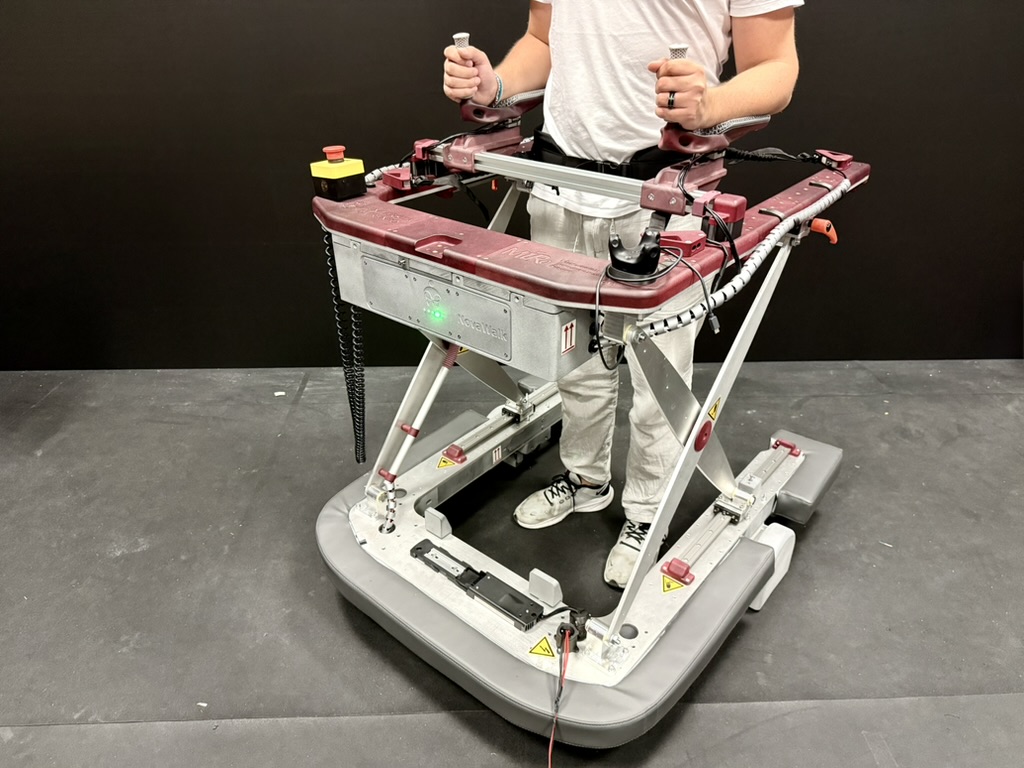
- NovaWalk is a robotic walker for rehabilitation of patients with neurological disorders
- Uses an impedance control strategy to drive the motor wheels according to the patient’s gait (load cells, IMU, encoders, cameras)
- A Raspberry Pi 5 running MADS is the central controller of the system, which collects data from sensors and peripherals, runs the control algorithm, and sends commands to the motors
- Certified for medical use, CE marked
INSA MFJA
- MFJA is a hybrid research-training shopfloor for Industry 4.0, part of INSA Toulouse, France
- MADS is used for collecting machining data from up to 20 machining centers, providing real-time shopfloor monitoring and data logging for optimizing energy consumption

MirrorWorld PRIN 2022
- Project task: to create a digital twin of an industrial setting to mirror operators behavior to check for personal safety
- Fuses data coming from wearable devices, 2-D and 3-D cameras, AI image processing to provide a real-time digital twin of the factory floor